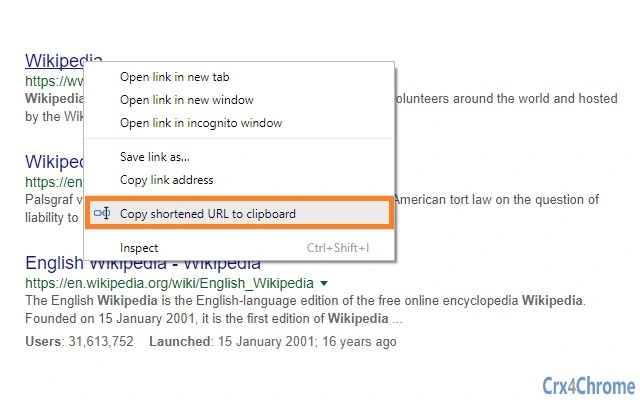

One-Click URL Shortening with Rebrandly
Overview
URL Shortener is a lightweight browser add-on designed to simplify the process of creating shortened links with minimal effort. Built for users who frequently share links online, the tool enables one-click URL shortening directly from the browser context menu. By integrating with the Rebrandly URL Shortener API, it provides a reliable and scalable solution for managing long web addresses.
The software is particularly useful for content creators, marketers, social media managers, and anyone who needs to distribute links across platforms like Twitter, email newsletters, or messaging apps. Its seamless workflow reduces the time spent on manual copying and pasting, improving efficiency in daily digital tasks. The developer, MyBrowserAddon, has focused on simplicity and functionality, delivering a no-frills tool that performs its core function without unnecessary complexity.
While the software does not include advanced analytics or branding features, it excels in speed and ease of use. Users can shorten any visible link on a webpage by right-clicking it and selecting the dedicated option. For page-level URLs, clicking the white area of the page triggers the same action.
The developer did not provide additional system requirements or usage statistics.
Key Features & Capabilities
- One-Click Shortening – Users can shorten any URL with a single right-click action from the browser context menu, eliminating the need for external tools or manual input.
- Automatic Clipboard Integration – The shortened URL is automatically copied to the system clipboard, allowing immediate use without additional steps.
- Rebrandly API Integration – The add-on leverages the Rebrandly API to generate short links, ensuring compatibility with a widely used and trusted URL shortening service.
- Context-Aware Link Selection – When right-clicking a link, the add-on uses that URL as the source. Clicking on the white area of the page defaults to the current page’s URL.
- API Key Configuration – Users must obtain and enter an API key through the add-on’s settings page to activate functionality, ensuring secure and personalized usage.
These features support practical workflows such as quickly sharing blog posts on social media, embedding shortened links in emails, or preparing content for campaigns. The integration with Rebrandly allows users to maintain consistent branding if they have a custom domain. The developer did not specify advanced features like link tracking, analytics, or custom slugs, but the tool remains effective for basic, rapid link shortening tasks.
User Interface, Workflow & Performance
The user interface of URL Shortener is minimal and embedded within the browser’s context menu, ensuring a non-intrusive experience. The only visible interaction is the addition of a single menu item: “Copy Shortened URL to clipboard.” This design choice prioritizes usability and reduces visual clutter. Navigation is intuitive—users simply right-click any link or the page background, select the option, and proceed.
The workflow is streamlined: no additional windows, pop-ups, or input fields are required. Performance is expected to be efficient, as the tool relies on an external API rather than local processing. The developer did not specify resource usage details, but given the small size of 3.1 MB and the nature of the task, it is likely to have a low impact on system performance.
Stability is maintained through the use of a well-documented API, though the tool’s reliability depends on the availability of the Rebrandly service. No performance benchmarks or CPU/RAM behavior were provided.
Compatibility & System Requirements
URL Shortener is compatible with Windows, Mac, and Linux operating systems, making it accessible to a broad range of users across different platforms. The software is designed as a browser extension, so it functions within supported web browsers. The current version is 1.0.1, released on April 5, 2025.
The installation size is 3.1 MB, which is compact for a browser add-on. The developer did not specify exact system requirements such as minimum RAM, processor speed, or browser versions. Compatibility information was partially provided, with no mention of supported browsers or specific OS versions.
Users are advised to ensure their browser supports extensions and has access to the Rebrandly API. The developer did not list any hardware limitations or dependencies beyond the API key requirement.
Pros and Cons
Pros
- One-click URL shortening via right-click context menu
- Automatic clipboard copying reduces manual steps
- Secure integration with Rebrandly API using user-provided keys
- Lightweight at 3.1 MB with minimal system impact
- Available on Windows, Mac, and Linux platforms
Cons
- Requires an API key from Rebrandly before use
- No built-in analytics or tracking features
- Dependent on external API service availability
- Limited customization options for shortened URLs
- No direct support for bulk URL processing
FAQ Section
Is URL Shortener compatible with all browsers?
The software is designed for browser extensions and works on supported platforms, but the developer did not specify which browsers are officially supported.
Is the software safe to use?
Yes, the tool does not collect personal data or store URLs. It uses the Rebrandly API with user-provided credentials, ensuring secure handling of link data.
How do I get an API key for Rebrandly?
Users must visit the add-on’s option page to access the Rebrandly API key setup. The key must be entered in the extension settings to activate functionality.
Can I use this tool offline?
No, the tool requires an active internet connection to communicate with the Rebrandly API. It cannot function without online access.
Is the software free to download and use?
Yes, the software is available at no cost. The developer has released it as a free tool for users who need quick link shortening.
Final Thoughts
URL Shortener delivers on its promise: a fast, reliable, and simple way to shorten links with a single click. Its integration with Rebrandly ensures a trustworthy backend, while the minimal interface avoids distractions. Although it lacks advanced features like analytics or bulk processing, it excels in core functionality for users who prioritize speed and simplicity.
The tool is ideal for professionals managing multiple online campaigns, content creators sharing links across platforms, and everyday users who want to streamline their workflow. With cross-platform support and a lightweight footprint, it fits seamlessly into any digital routine. The developer has focused on essential usability, making it a solid choice for basic URL management.
Download URL Shortener now to simplify your link-sharing process.
Download URL Shortener now







